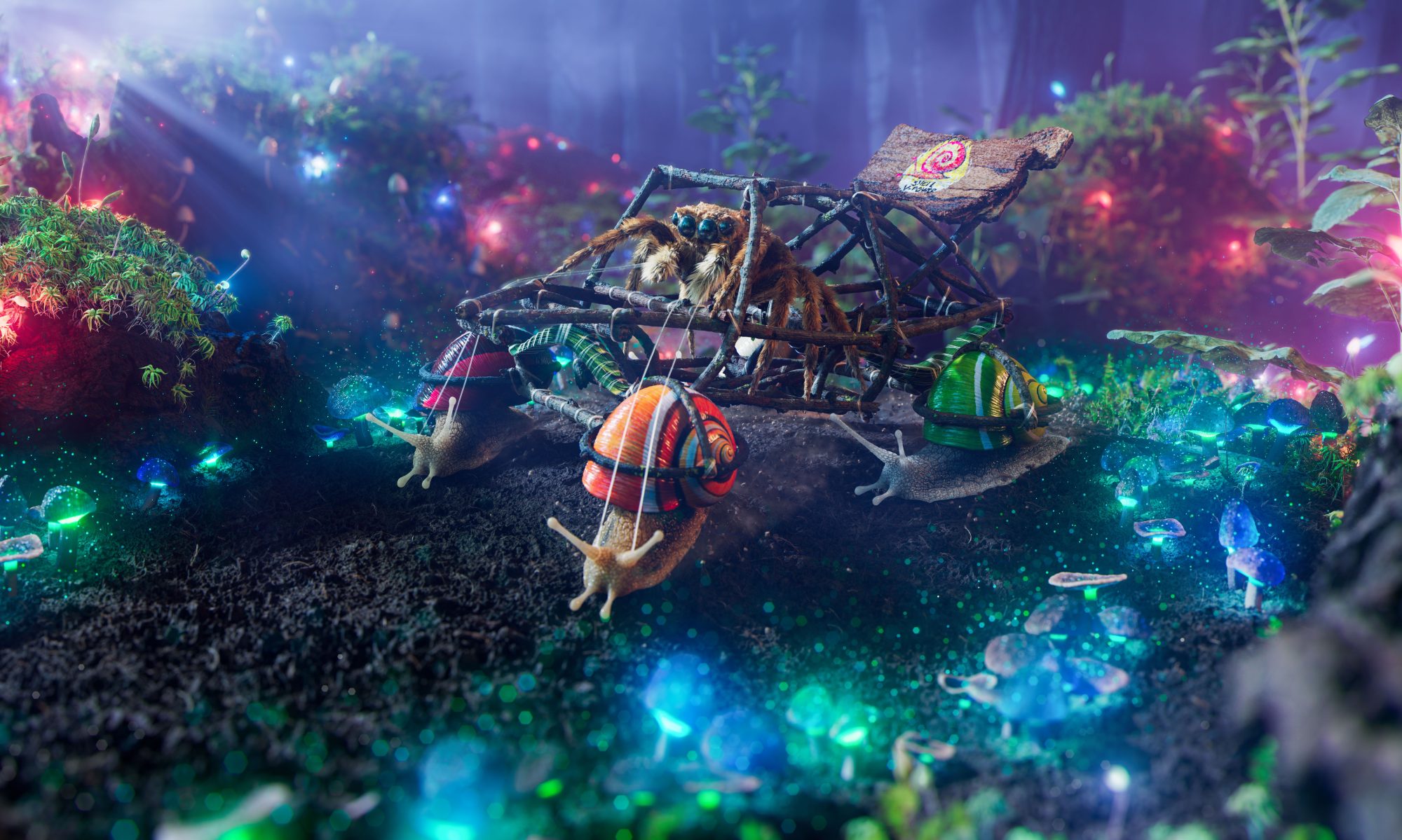

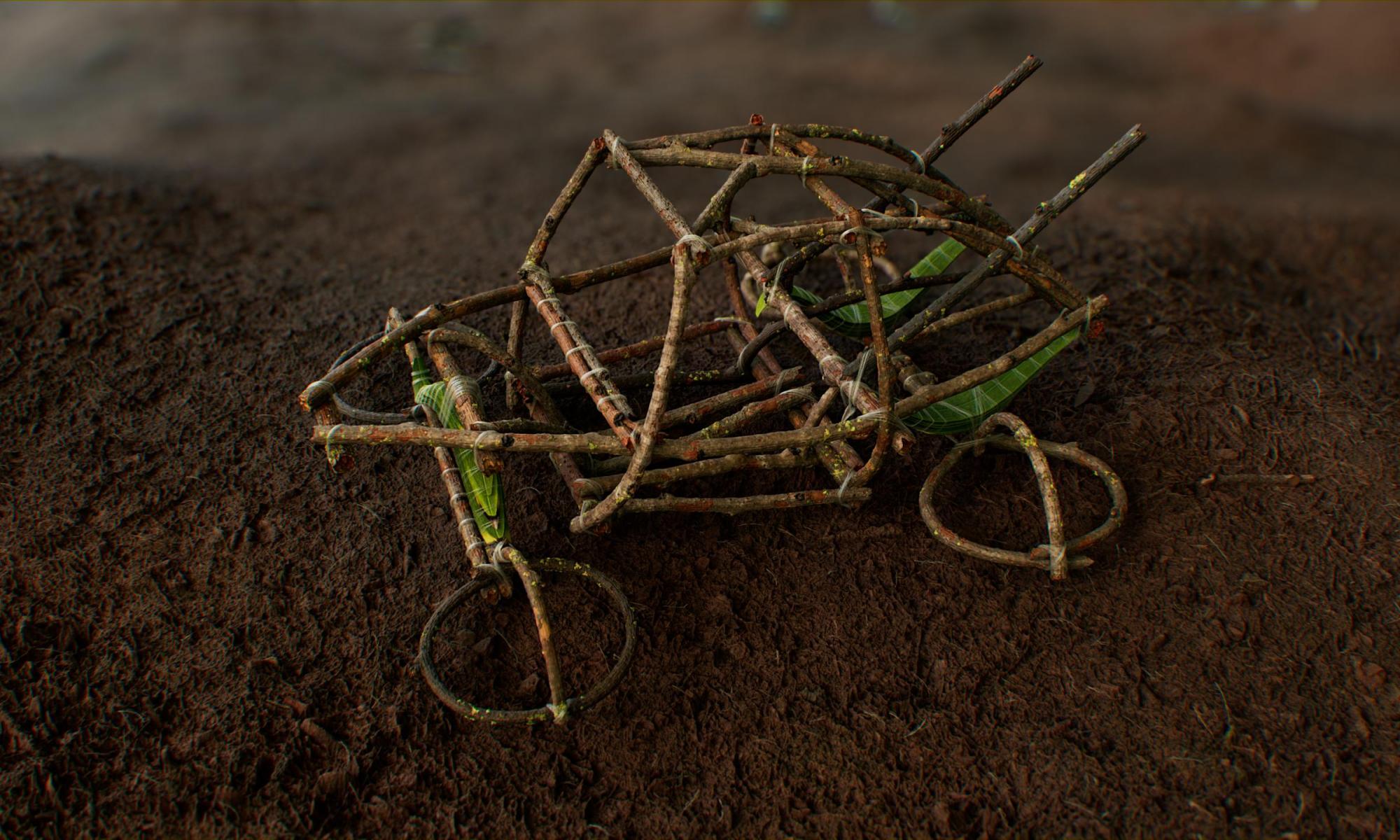
Here I will go through how I created the stick generator for the car in the recent artwork I created for the 3DModels automotive rendering challenge. After coming up with a concept for the car I needed to make some sticks to build the chassis with. At first I planned to go on a little scavenger hunt in the local forest and try and find and scan twigs then assemble them into a car. I quickly realized that this was going to be an insane amount of work as there were 36 separate sticks in my concept so I decided to dive into the world of procedural modelling in Houdini.
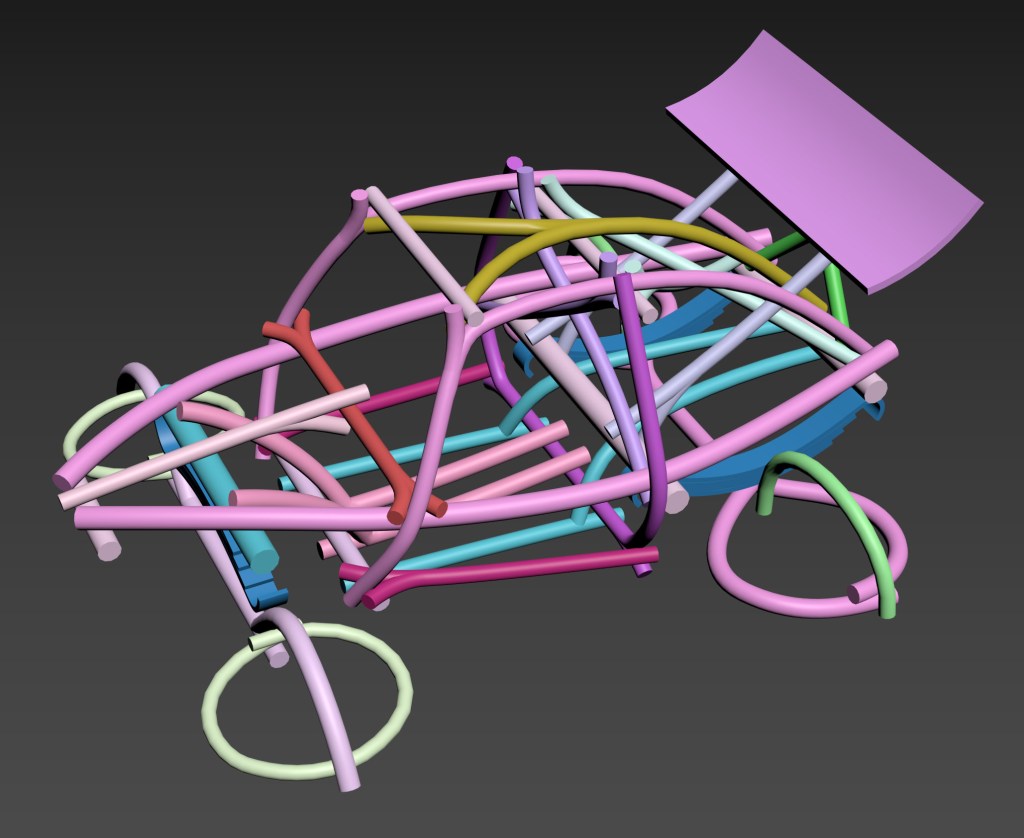
A little disclaimer, this was my first real attempt at making a HDA so please be gentle, there are a fair few things I would do differently now but I will still make the HDA available to anyone who wants it and I will go through how it works here.
The concept is pretty simple, make a curve that the stick will follow, measure the length, create a stick pointing straight up, deform it back to the curve then bake the height and colour into bitmaps. of course it gets a little more complex when we need the stick to have a fork but a loop will take care of that. Right now this only works with a maximum of 2 input curves like below as that is all I needed it for but it should be pretty straightforward to make it work with any number of inputs
There are a lot of controls on the HDA, way too many in hindsight, the default settings were fine for the scale I was working at, which was also wrong, noob mistake but this was how the concept came out of 3DS Max so I just went with it. for reference this is about 10m long, so it really is massive. you can check out what the settings do yourself but the main ones are the proxy mode, which does a quick representation of the stick for positioning and things, and the bake button which will bake the textures and height to bitmaps

Step 1 is to draw you curves, then resample so we have a proper polywire (the segment length isn’t super important). the curve direction does matter and should always start with the base so you can add a reverse node if it needs to switch. You also need a pscale to define the base thickness that everything will be built on top of, I have just done this with a ramp in a wrangle, then merge the curves and pipe them into the HDA.
To see exactly how this works you can obviously just dive into it but I’ll also outline it here;
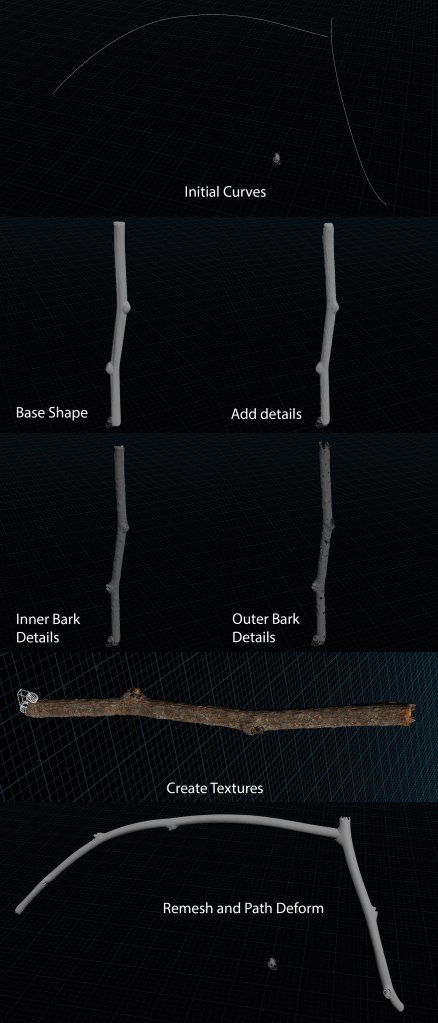
One of the more challenging parts of this was to make sure the 2 sticks lined up with each other, there is a kind of bump that needs to be modelled on the first stick for where the second one grows from, so the orientation had to be pulled from the second line within the first loop, deforming the line and calculating the orient from the first point on the second curve did the trick here, I have avoided using quaternions in the past as I find them very confusing but this helped my to understand them a bit better
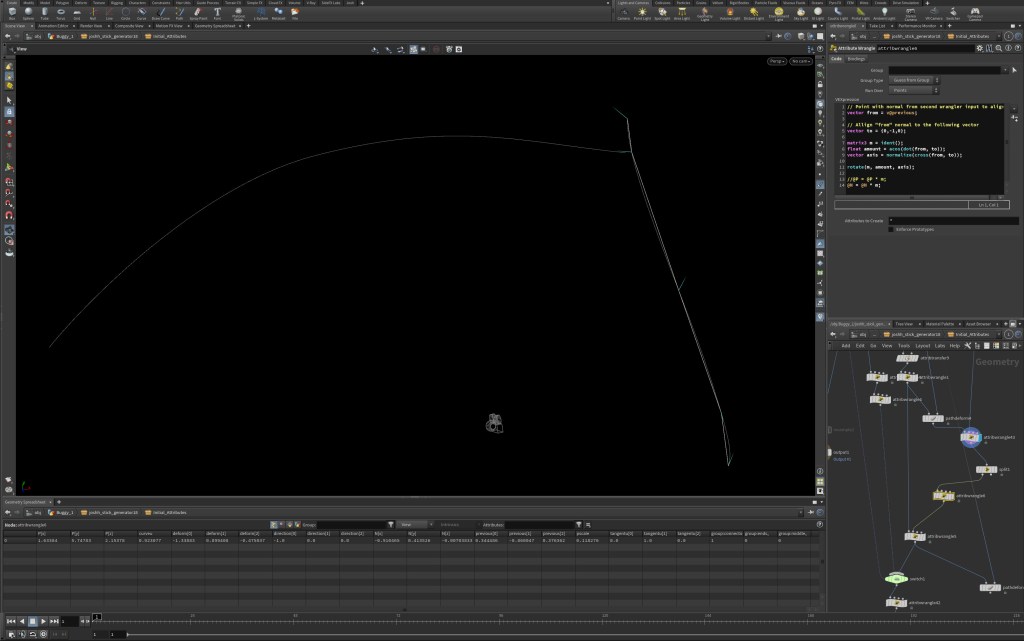
All we are doing is rotating the vector from the angle that we are measuring from the pre-deformed path, there is a little more going on it the screenshot because we have attributes that store the target direction but the basic code is as below
// Point with normal from second input to align to

vector from = point(1, 'N', 0);


// Align "from" normal to the following vector

vector to = {0,1,0};


matrix3 m = ident();

float amount = acos(dot(from, to));

vector axis = normalize(cross(from, to));


rotate(m, amount, axis);


@N = @N * m;
The textures were done with a combination of procedural noises and scanned tri-planar projections. The Labs tools have a tri-planar displacement tool which is really nice here. I have also included the maps I created which were based off some scanned textures from with some modifications to give the results I needed
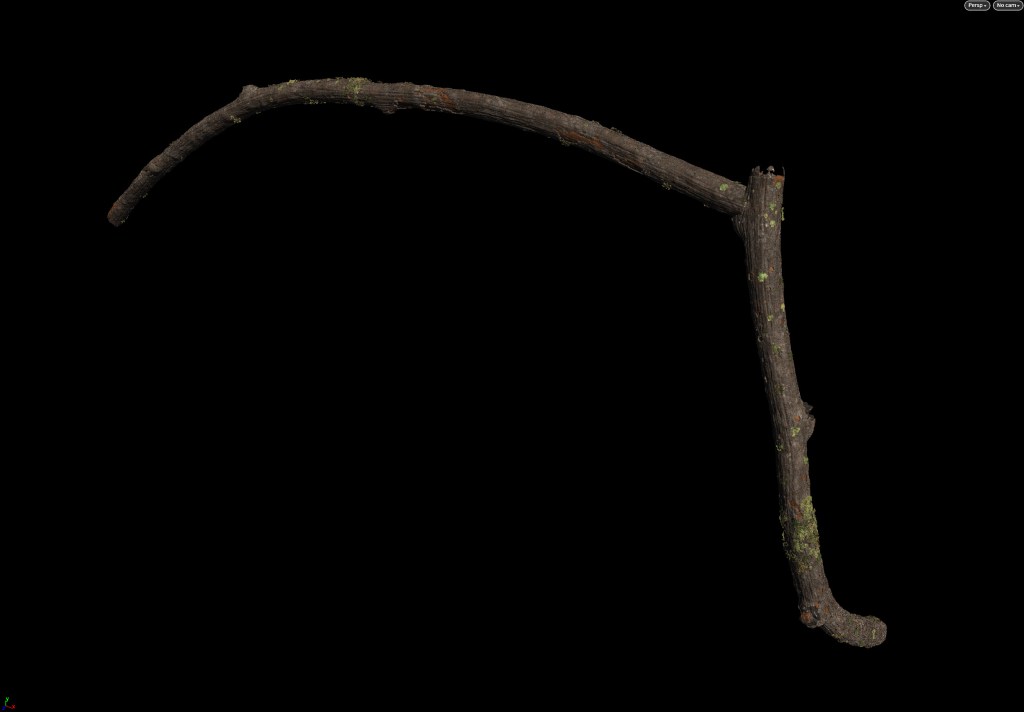
The last cool thing is the lichens, these were made using a differential growth model inside a solver, then each frame was cached out and these are randomly copied to points scattered on the surface. The animation is pretty ropy but it does the job

The baking is done via the Substance Automation Toolkit, there is a Labs baker in Houdini but substance works much better, it is available from the command line so we can run it from the HDA. there is some python code that you will need to add to a repro located in your PYHTONPATH env variable as follows that the ‘bake’ button will run. this code also build a v-ray shader with the exported maps so can be changed if needed for another rendering engine or simply removed altogether
I will make another blog post about creating a python repo for Houdini and setting an environment variable so the program can pick things up for a central space, this is useful if you need to share tools in a studio, it’s not that hard but there isn’t that much info on it
Another disclaimer is that I have changed the SubstanceBaker class since I last used this so hopefully it still works, if it doesn’t just contact me and I will fix it if anyone needs it
import hou

import os

import sys

import subprocess

import time

import shutil

import tempfile

from string import Template


def stick_builder():

    node = hou.pwd()

    topnet = node.parent()

    hda = topnet.parent()

    geo_container = hda.parent()

    name = hda.parm('name').eval()


    '''#test arguments

    name = 'Stick_1'

    geo_container = "Stick_Generator"'''


    #name = f'{geo_container}_{basename}'


    hip_path = hou.hscriptExpandString("$HIP")

    os.chdir(hip_path)

    geo_path = os.path.join(hip_path, 'geo', 'Sticks')

    output_dir = os.path.join(hip_path, 'tex', 'Sticks')

    mesh_high = os.path.join(geo_path, name+'_high.fbx')

    mesh_low = os.path.join(geo_path, name+'_low.fbx')


    size = '13' #set the size, this 2 with an exponent of the number, so 10 is 1024


    result = SubstanceBaker(output_dir,

                        mesh_low,

                        mesh_high,

                        size,

                        name,

                        colour=True,

                        curvature=False,

                        thickness=False,

                        normal=False,

                        height=True)


    # Create vray material builder

    vray_vop_material = hou.node('/mat').createNode('vray_vop_material', f'{name}_mtl')

    VRayNodeBRDFVRayMtl = hou.node(vray_vop_material.path()+'/vrayMtl')

    vray_material_output = hou.node(vray_vop_material.path()+'/vrayOutput')


    # modify material parameters

    VRayNodeBRDFVRayMtl.parm('gtr_gamma').set(1)

    VRayNodeBRDFVRayMtl.parm('reflect_glossiness').set(0.6)

    VRayNodeBRDFVRayMtl.parm('refract_ior').set(1.45)

    VRayNodeBRDFVRayMtl.parm('translucency').set('6')

    VRayNodeBRDFVRayMtl.parm('fog_mult').set(100)

    VRayNodeBRDFVRayMtl.parm('translucency_amount').set(0.8)

    VRayNodeBRDFVRayMtl.parm('reflectr').set(1)

    VRayNodeBRDFVRayMtl.parm('reflectg').set(1)

    VRayNodeBRDFVRayMtl.parm('reflectb').set(1)


   # add base colour

    colour_img = hou.node(vray_vop_material.path()).createNode('VRayNodeMetaImageFile', 'basecolour')

    colour_img.parm('BitmapBuffer_file').set(f'$HIP/tex/Sticks/{name}_colour.png')

    colour_img.parm('BitmapBuffer_color_space').set('2')

    #colour_img.parm('TexOCIO_use').set(True)

    #colour_img.parm('TexOCIO_colorspace_in').set('4')


    # create colour correction

    VRayNodeColorCorrection = hou.node(vray_vop_material.path()).createNode('VRayNodeColorCorrection')

    VRayNodeColorCorrection.parm('contrast').set(1.15)

    VRayNodeColorCorrection.parm('brightness').set(0.1)

    VRayNodeColorCorrection.setInput(0, colour_img)


    #create gloss noise

    VRayNodeTexBerconNoise = hou.node(vray_vop_material.path()).createNode('VRayNodeTexBerconNoise', 'gloss_noise')

    VRayNodeUVWGenObject = hou.node(vray_vop_material.path()).createNode('VRayNodeUVWGenObject')

    VRayNodeTexBerconNoise.setInput(23, VRayNodeUVWGenObject)

    VRayNodeTexBerconNoise.parm('noise_size').set(0.05)

    VRayNodeTexBerconNoise.parm('fractal_type').set('1')

    VRayNodeTexRemap = hou.node(vray_vop_material.path()).createNode('VRayNodeTexRemap')

    VRayNodeTexRemap.setInput(1, VRayNodeTexBerconNoise)

    VRayNodeTexRemap.parm('output_min').set(0.1)

    VRayNodeTexRemap.parm('output_max').set(0.5)


    # Connect outputs

    VRayNodeBRDFVRayMtl.setInput(0, VRayNodeColorCorrection)

    VRayNodeBRDFVRayMtl.setInput(8, VRayNodeTexRemap)

    VRayNodeBRDFVRayMtl.setInput(25, VRayNodeColorCorrection)


    #create reflect noise

    reflect_VRayNodeTexBerconNoise = hou.node(vray_vop_material.path()).createNode('VRayNodeTexBerconNoise', 'reflect_noise')

    reflect_VRayNodeUVWGenObject = hou.node(vray_vop_material.path()).createNode('VRayNodeUVWGenObject')

    reflect_VRayNodeTexBerconNoise.setInput(23, reflect_VRayNodeUVWGenObject)

    reflect_VRayNodeTexBerconNoise.parm('noise_size').set(0.075)

    reflect_VRayNodeTexBerconNoise.parm('fractal_type').set('1')

    reflect_VRayNodeTexBerconNoise.parm('fractal_levels').set(5)

    reflect_VRayNodeTexRemap = hou.node(vray_vop_material.path()).createNode('VRayNodeTexRemap')

    reflect_VRayNodeTexRemap.setInput(1, reflect_VRayNodeTexBerconNoise)

    reflect_VRayNodeTexRemap.parm('output_min').set(0.75)

    reflect_VRayNodeTexRemap.parm('output_max').set(1)


    # connect noise

    VRayNodeBRDFVRayMtl.setInput(7, reflect_VRayNodeTexRemap)


    #create bump noise

    bump_VRayNodeTexBerconNoise = hou.node(vray_vop_material.path()).createNode('VRayNodeTexBerconNoise', 'bump_noise')

    bump_VRayNodeUVWGenObject = hou.node(vray_vop_material.path()).createNode('VRayNodeUVWGenObject')

    bump_VRayNodeTexBerconNoise.setInput(23, bump_VRayNodeUVWGenObject)

    bump_VRayNodeTexBerconNoise.parm('noise_size').set(0.025)

    bump_VRayNodeTexBerconNoise.parm('fractal_type').set('1')

    bump_VRayNodeTexBerconNoise.setInput(0, VRayNodeTexBerconNoise)

    bump_VRayNodeTexBerconNoise.setInput(1, reflect_VRayNodeTexBerconNoise)


    # connect noise

    VRayNodeBRDFVRayMtl.setInput(5, bump_VRayNodeTexBerconNoise)

    VRayNodeBRDFVRayMtl.parm('bump_amount').set(0.005)


    # add height

    height_img = hou.node(vray_vop_material.path()).createNode('VRayNodeMetaImageFile', 'height')

    height_img.parm('BitmapBuffer_file').set(f'$HIP/tex/Sticks/{name}_height.png')

    height_img.parm('BitmapBuffer_color_space').set('0')


    # clamp height

    VRayNodeTexClamp = hou.node(vray_vop_material.path()).createNode('VRayNodeTexClamp', "Height_Out")

    VRayNodeTexClamp.parm('max_colorr').set(0.6)

    VRayNodeTexClamp.parm('max_colorg').setExpression('ch("max_colorr")')

    VRayNodeTexClamp.parm('max_colorb').setExpression('ch("max_colorr")')

    VRayNodeTexClamp.setInput(0, height_img)


    # add displacement

    VRayNodeGeomDisplacedMesh = hou.node(vray_vop_material.path()).createNode('VRayNodeGeomDisplacedMesh')

    #VRayNodeGeomDisplacedMesh.parm('displacement_texture').set(VRayNodeTexClamp.path())

    VRayNodeGeomDisplacedMesh.setInput(0, VRayNodeTexClamp)

    VRayNodeGeomDisplacedMesh.parm('displacement_amount').set(0.25)

    VRayNodeGeomDisplacedMesh.parm('displacement_shift').setExpression('ch("displacement_amount")*-0.5')

    vray_material_output.setInput(1, VRayNodeGeomDisplacedMesh)


    # rearrange

    hou.node(vray_vop_material.path()).layoutChildren()


    # import low geo

    file_node = hou.node(f'/obj/{geo_container}').createNode('file')

    file_node.parm('file').set(mesh_low)

    pack_node = hou.node(f'/obj/{geo_container}').createNode('pack')

    pack_node.setInput(0, file_node)

    material_node = hou.node(f'/obj/{geo_container}').createNode('material')

    material_node.setInput(0, pack_node)

    material_node.parm('shop_materialpath1').set(f'/mat/{name}_mtl')


    # rearrange

    file_node.moveToGoodPosition()

    pack_node.moveToGoodPosition()

    material_node.moveToGoodPosition()


    # Create a signal file to notify that the node cooking has completed

    with open("signal.txt", "w") as signal_file:

        signal_file.write("Completed")

class SubstanceBaker:

    def __init__(self,

                 output_dir,

                 mesh_low,

                 mesh_high,

                 size,

                 name,

                 colour,

                 curvature,

                 thickness,

                 normal,

                 height):

        # define globals

        sbsBaker = r"C:\Program Files\Adobe\Adobe Substance 3D Designer\sbsbaker.exe"

        self.object_list = []

        print(mesh_low)

        print(mesh_high)


        if colour:

            colour_commandArgs = (f'color-from-mesh {mesh_low} '+

                           f'--highdef-mesh {mesh_high} '+

                           '--color-source 0 '+

                           f'--output-size {size},{size} '+

                           f'--output-name {name + "_colour"} '+

                           f'--output-path {output_dir}')


            self.colour_result = subprocess.check_output('"{0}" {1}'.format(sbsBaker, colour_commandArgs))

            self.colour_file = f'{output_dir}/{name + "_colour.png"}'

            self.object_list.append(self.colour_file)

            print (f'{self.colour_file} has been cretaed')

        else:

            pass


        if curvature:

            curvature_commandArgs = (f'curvature-from-mesh {mesh_low} '+

                             f'--highdef-mesh {mesh_high} '+

                             f'--output-size {size},{size} '+

                             f'--output-name {name + "_curvature"} '+

                             f'--output-path {output_dir}')


            self.curvature_result = subprocess.check_output('"{0}" {1}'.format(sbsBaker, curvature_commandArgs))

            self.curvature_file = f'{output_dir}/{name + "_curvature.png"}'

            self.object_list.append(self.curvature_file)

            print (f'{self.curvature_file} has been cretaed')

        else:

            pass


        if thickness:

            thickness_commandArgs = (f'thickness-from-mesh {mesh_low} '+

                             f'--highdef-mesh {mesh_high} '+

                             f'--output-size {size},{size} '+

                             f'--output-name {name + "_thickness"} '+

                             f'--output-path {output_dir}')


            self.thickness_result = subprocess.check_output('"{0}" {1}'.format(sbsBaker, thickness_commandArgs))

            self.thickness_file = f'{output_dir}/{name + "_thickness.png"}'

            self.object_list.append(self.thickness_file)

            print (f'{self.thickness_file} has been cretaed')

        else:

            pass


        if normal:

            normal_commandArgs = (f'normal-from-mesh {mesh_low} '+

                             f'--highdef-mesh {mesh_high} '+

                             f'--output-size {size},{size} '+

                             f'--output-name {name + "_normal"} '+

                             f'--output-path {output_dir}')


            self.normal_result = subprocess.check_output('"{0}" {1}'.format(sbsBaker, normal_commandArgs))

            self.normal_file = f'{output_dir}/{name + "_normal.png"}'

            self.object_list.append(self.normal_file)

            print (f'{self.normal_file} has been cretaed')

        else:

            pass


        if height:

            height_commandArgs = (f'height-from-mesh {mesh_low} '+

                             f'--highdef-mesh {mesh_high} '+

                             f'--output-size {size},{size} '+

                             f'--output-name {name + "_height"} '+

                             f'--output-path {output_dir}')


            self.height_result = subprocess.check_output('"{0}" {1}'.format(sbsBaker, height_commandArgs))

            self.height_file = f'{output_dir}/{name + "_height.png"}'

            self.object_list.append(self.height_file)

            print (f'{self.height_file} has been cretaed')

        else:

            pass
Here are some examples of the baked textures


and as promised the HDA with textures and an example scene, it is almost 1GB as the textures are 8K, let me know if you have any issues or if you make anything cool!
 Josh Halford
One Reply to “”